New Report Category - Little Original Content


Posted by Si Dawson on 28/03/10 in Improvements

I've added a new category to the bottom of the reports, "Little Original Content."

This covers two areas:

People who retweet 70% or more of the time

Of course, some people do find the best stuff out there, but in general, if someone is only ever RTing things by other people - why not just follow the other person? This is also something that is done a lot by spam bots, to make them appear ‘more human.'

People who post quotes more than 50% of the time

Similarly to retweeting, spam bots often intersperse their crap with quotes. It's a zero effort way for them to have ‘fresh' content. In reality though, if they're quoting Epicurius, this probably isn't something you need to be getting second-by-second Twitter updates on, the guy's been dead 2300 years!

That said, as with everything on the reports, there will always be those you choose to follow that fit into the above categories (eg, I follow a couple of accounts that post nothing but quotes). Just click their icons & they'll be saved.

If you don't want to unfollow any of them,  simply click the headings, & the the entire category will be saved. As easy as ever!
Safer Logins - Greater Transparency


Posted by Si Dawson on 08/03/10 in Improvements

Given the number of people that have had their accounts hacked recently, there are a lot of people getting very nervous about entering their Twitter username & password anywhere.

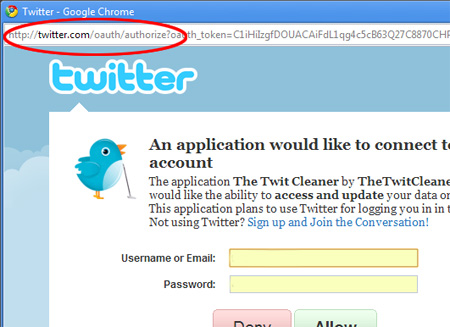
I also had a bit of a look at the login process & realised - once the login window pops up, it could be pointing anywhere. I.e. without digging deeply into things (e.g., even View|Source on the page wouldn't necessarily confirm the originating site), how would a nervous/unsuspecting user know that we were legit?

Obviously this isn't good.

So, I've updated the login window.

The location bar now shows at the top of the login window. It's a bit uglier, but a lot clearer.

You can now see that you're at Twitter.com when you're entering your username/password for OAuth authentication. You're only asked to enter username/password if you're not already logged into Twitter via the website, but anything that makes things just that little bit more obvious is always welcome.